

MEET ALERT-POP.
Know what’s happening.
Know what to do next.
A clear screen and thoughtful protection logic bring the charging process into view.
USEFUL INFORMATION, AT A GLANCE.
More than a blinking light.
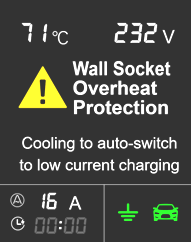
The display shows current, voltage, live power, elapsed time and delivered energy, together with vehicle connection, grounding and charging status. Applicable models also show delay settings, monitored temperature and Wi-Fi connection.
The catalog lists six alert languages for the European Alert-Pop family. Availability varies by model and firmware.

FROM MEASUREMENT TO ACTION.
How the protection responds.
| Catalog protection | Condition described | Charger response |
|---|---|---|
| Domestic plug temperature | Above 70°C on applicable EU domestic-plug versions | Pauses; reduced-current restart after cooling below 60°C. Not the CEE industrial-plug rule. |
| EU control-box temperature | 80°C internal temperature | Stops; reduced-current restart at 75°C; full power restored below 70°C, per platform description. |
| EU voltage monitoring | Below 80 V or above 270 V as stated for the platform | Pauses; resumes after voltage returns to the permitted range. |
| EU overcurrent monitoring | Excess beyond the greater of 2 A or 20% | Pauses for 1 minute before a derated restart; a repeat lasting 5 seconds triggers shutdown per catalog. |
| Pre-charge checks | Relay and residual-current protection checks | Checks the relevant safety functions before normal operation. |
This table explains the catalog’s European platform behavior. It is not a replacement for the exact model’s hardware manual, and the thresholds must not be applied to all North American products. Never use the table to bypass protection or attempt electrical repairs.
Status without the guesswork.
| Indicator | Meaning in the catalog |
|---|---|
| White | Initial self-test |
| Blue | Standby / completed |
| Rolling green | Charging |
| Red | Protection / error condition |
| Flashing red | Critical error |
Two familiar controls.
The A key sets charging current; the C key sets a delay on the applicable portable controller. A displayed delay such as 02:30:00 means “after two hours and thirty minutes,” not a clock time.
More context in MiniApp.
Supported connected models can show Health self-test reports, safety-event history, monitored temperatures and Diagnostics. Use this information to explain a problem to support.
YOUR NEXT CHAPTER IS ELECTRIC.