
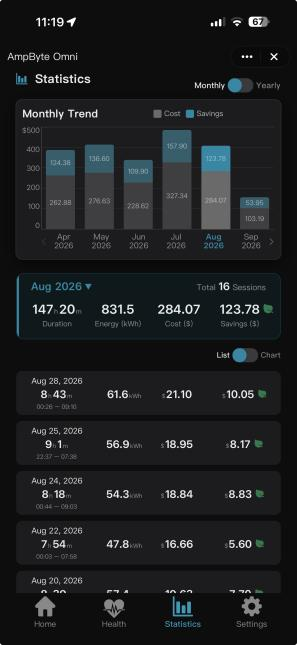
See energy, cost and savings.
Explore monthly and yearly views, session details and CSV export where available. Keep your Rate Plan up to date for meaningful estimates.
Help with session records ↗
MEET MINIAPP 2.0
Five signature features. One connected experience. Bring your electricity tariff, charging routine, rooftop solar and home demand into the same conversation.
Runs inside Tuya Smart on supported connected chargers.
A warm reception at IFA Berlin.
A smarter routine for life at home.
Charger Smarter, Pay Less.
Choose the goal that matters today: use a lower-rate window, follow a dynamic tariff, charge from surplus solar, or leave more capacity for the rest of the home.
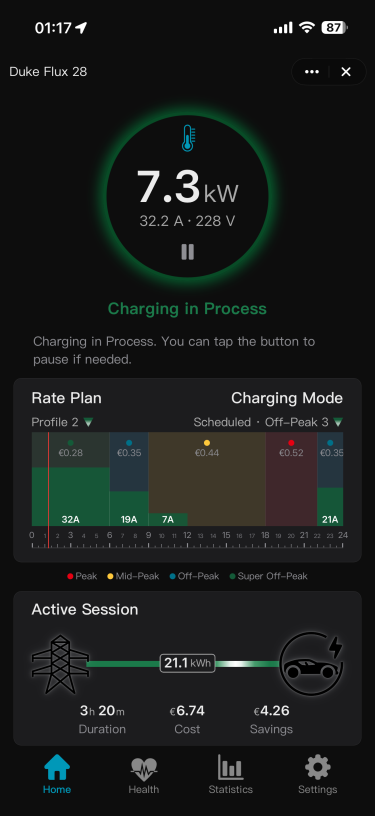
Live power, current and voltage sit alongside the active rate plan, charging timeline and session estimates. The information you need stays together.
Download the MiniApp 2.0 manual ↓01 / KNOW YOUR PRICE
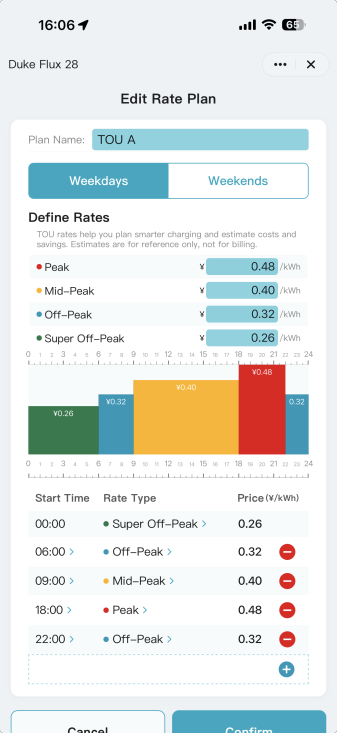
Your electricity contract becomes a clear, color-coded day. See the lower-rate windows before deciding when to charge.
Enter the tariff tiers your utility uses, rather than relying on a generic overnight rate.
Set both day types so your plan reflects the way your contract really works.
Drag timeline boundaries to change time periods, or use the table for precise entries. Name and select the plan you want active.
Timeline colors and cost estimates depend on the plan you enter. Update it when your tariff changes; estimates are for reference, not utility billing.
02 / GIVE GOOD TIMING A ROUTINE
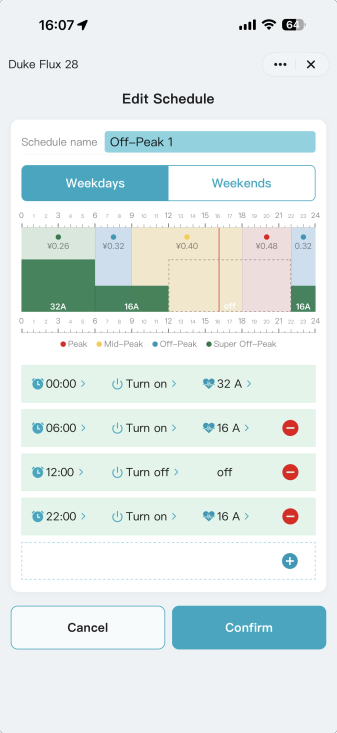
See your active Rate Plan behind the charging schedule. Put your ON and OFF events inside the lower-rate windows, and let the charger remember the routine.
The rate plan stays visible in the background while you build the schedule in the foreground.
Add ON/OFF events and permitted current changes. Adjust time boundaries and current levels directly on the timeline.
Save weekday and weekend settings, then activate the intended schedule on Home.
Leave the charger powered and the EV connected. Use one scheduler: if the car and MiniApp both have schedules, their windows must overlap.
03 / KEEP UP WITH A CHANGING TARIFF
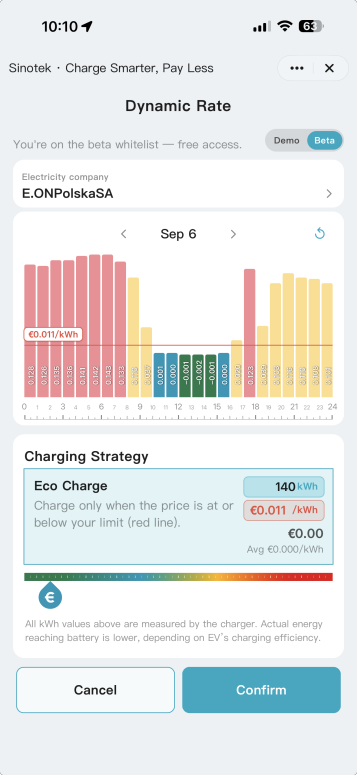
For supported live or day-ahead tariffs, MiniApp brings market pricing into the charging experience. Move the price threshold to shape your charging strategy.
Supported markets · subscription / limited accessSelect your location, electricity provider and supported Dynamic Market to load the latest rate data.
Drag the red price threshold on the chart, then confirm the strategy that suits your needs.
Use Dynamic Rate for a supported variable-price contract; TOU Rate Plan remains the option for entering fixed tariff periods.
The supplied manual describes a paid subscription feature currently open to selected beta testers. Availability depends on country, provider, account and activated product. Data is supplied through Tuya’s Conow Labs from third-party sources; check rates, currency and any exchange-rate setting.
04 / TAKE YOUR SUNSHINE WITH YOU
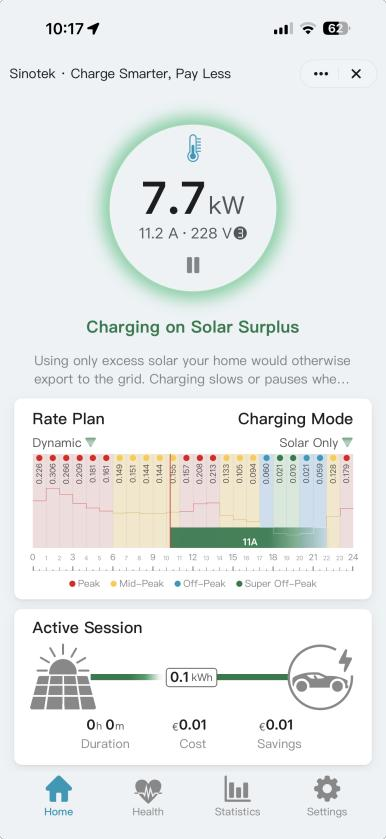
When your home is generating more solar energy than it needs, a compatible MiniApp setup can put that surplus to work in your EV.
Compatible smart meter requiredA specified meter measures the home’s main incoming supply. Once enough surplus is available, charging starts automatically.
On supported three-phase hardware, the manual describes an automatic switch to single phase when surplus falls below the three-phase minimum of 6 A per phase.
Bind the online meter to the charger, then choose Solar Only instead of following a fixed charging schedule.
Requires compatible meter, charger, firmware and feature activation. Solar Only favors surplus; it does not guarantee zero grid use. The manual describes stopping after grid draw reaches 3 A or more for over 30 minutes, or after the meter remains offline for 10 minutes.
05 / MAKE ROOM FOR THE WHOLE HOME
The oven, household appliances and EV all share your home’s supply. DLB adjusts charging current as household demand changes, helping keep total demand within the configured limit.
Compatible smart meter requiredSet the main breaker’s current rating using the correct installation information. The system applies a safety margin.
A compatible meter reports whole-home demand; the charger adjusts its current as that demand changes.
Supported multi-charger setups use one Master and up to two Slaves. The Master’s configured supply limit is shared.
Requires compatible metering, correct installation settings and activated products. DLB manages available current; it does not replace wiring, breaker sizing or required protection. The standalone DLB-A1 monitor is a different system and is not managed in MiniApp.
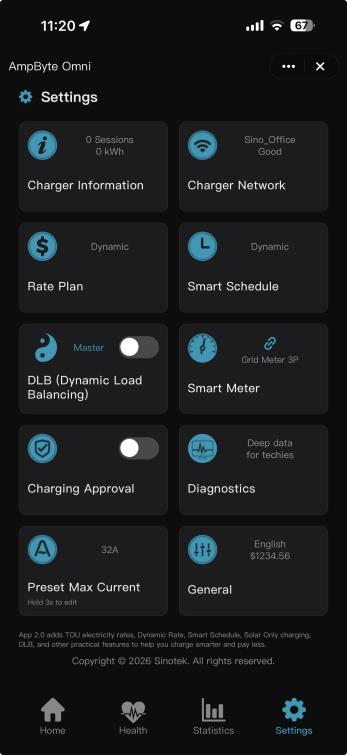
One Master + up to two Slaves on supported systems
CONFIDENCE, BEYOND THE CHARGING MODE.
The five signature features are supported by clear records, useful diagnostics and everyday access controls.
Explore monthly and yearly views, session details and CSV export where available. Keep your Rate Plan up to date for meaningful estimates.
Help with session records ↗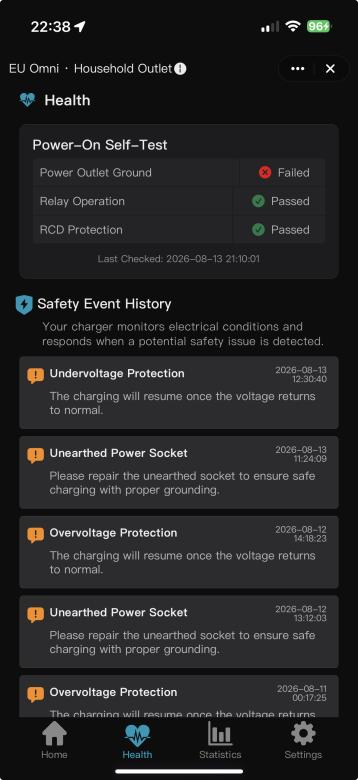
Review power-on self-tests, safety events and supported temperature or diagnostic readings when preparing a support question.
Find safety support ↗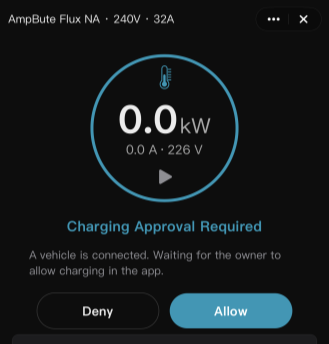
Use Tuya device sharing, approve charging requests in the host app, or authorize with NFC on supported hardware.
Open the setup guide ↗YOUR RATES. YOUR POTENTIAL.
Compare the energy cost of charging at two different rates. Use prices from your own utility plan.
Illustrative starting values, not regional averages. Energy input is measured at the charger; fixed fees, taxes and tariff-specific charges are excluded. This is not a bill forecast.
$432.00 over 12 identical months
250 kWh × 80% × ($0.30 − $0.12) / kWh. Actual results depend on your available charging window.
BUILD YOUR CONNECTED SETUP.
Confirm MiniApp compatibility on the exact charger. A wallbox’s Tuya W version and OCPP P version are different platform choices.
Explore the full collection ↗Solar Only and app-based DLB require the specified compatible meter on the main incoming supply, correctly installed and bound.
Explore SDM01-12TS ↗Add the charger in Tuya Smart using 2.4 GHz Wi-Fi, enter your real tariff, and select the charging mode that fits your day.
Follow the quick-start guide ↗Feature descriptions and original screens: MiniApp 2.0 User Manual, version 20260911. Screens, labels and functions vary with charger, firmware, account and market. Savings depend on actual rates and charging patterns.
YOUR NEXT CHAPTER IS ELECTRIC.